Introduction
Someone sends you money. They ask for your “UPI ID.” You open Google Pay or PhonePe, find something like rahul@okaxis, and share it. Or just scan a QR code. Payment done in seconds.
That short ID you just shared is called a virtual payment address. Most people use one every day without knowing what it’s actually called, how it works, or why it exists.
This guide explains what VPA is in UPI, how to find yours, what it looks like across different apps, and what happens behind the scenes when you use it. Whether you split bills with friends or collect payments as a seller, this covers everything.
What Is VPA? (VPA Full Form and Meaning)
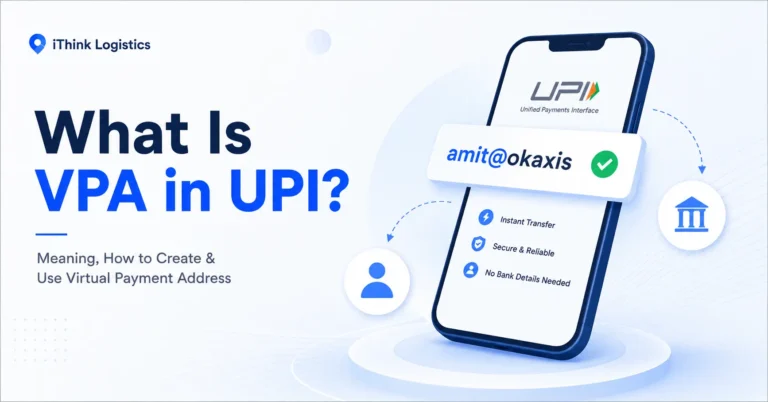
VPA stands for Virtual Payment Address. It is a unique digital ID used in India’s Unified Payments Interface (UPI) system that lets you send and receive money instantly without sharing your bank account number or IFSC code. That’s the VPA meaning in its simplest form.
Think of it like an email address, but for your bank account. Instead of giving someone a long account number and branch code (which is hard to remember), you share a short virtual payment address. The money reaches your linked bank account directly.
Every VPA follows a simple format: username@bankhandle.
The first part is your username. It can be your name, your phone number, or something custom you choose. The second part is the bank handle, which is assigned by the UPI app or bank you’re using. You don’t pick this part.
So rahul@okaxis means a user named Rahul, using Google Pay, with an Axis Bank handle. And 9876543210@ybl means a PhonePe user identified by their mobile number.
You may have a bank account at Kotak or HDFC, but the bank handle shows for your VPA is Axis, SBI, ICICI, or HDFC bank, like this: “name@okaxis.”
That format changes depending on which app you use. Here’s what VPAs look like across the major ones.
VPA Examples for Different UPI Apps
A VPA in PhonePe typically looks like 9876543210@ybl. A Google Pay VPA ID might appear as priya@okaxis or amit@okhdfcbank. Your Paytm VPA follows the format mobile@paytm, and BHIM keeps it simple with name@upi.
Here’s a quick reference:
| UPI App | VPA Format | Example |
| Google Pay | name@okaxis or name@okhdfcbank | priya@okaxis |
| PhonePe | mobile@ybl or name@ybl | 7890123456@ybl |
| Paytm | mobile@paytm | 8765432109@paytm |
| BHIM | name@upi | rahul@upi |
| Bank apps (SBI, HDFC, etc.) | name@bankhandle | sneha@oksbi |
The @bankhandle part is fixed by the app. You can only change the username before the @ symbol.
One person can have multiple VPAs. You can create a name-based one, like priya@okaxis, for personal use, and a number-based one, like 7890123456@ybl, for business. Both types of VPA can be created for the same bank account or different ones. It works the same way regardless of which app you use.
If you’re wondering where to find yours or how to set one up, here’s how.
How to Find and Create Your VPA
Most UPI apps show your virtual payment address in the profile or settings section. Here’s how to find your VPA on the two most popular apps, plus how to create a new one if you haven’t set up UPI yet.
How to Find Your VPA in Google Pay
1. Open Google Pay
2. Tap your profile icon in the top-right corner
3. Select “Bank Account” option in Payment methods section
4. In the payment methods window, select the bank account linked in GPay.
5. Now click on “Manage UPI IDs.”
6. Now you can check all 3 of your UPI IDs in GPay
Google Pay allows up to 3 UPI IDs per bank account with four bank handles: @okhdfc, @oksbi, @okaxis, and @okicici. The app auto-generates them using your name and bank handle. There is no option to set a custom or phone number-based VPA in Google Pay.
How to Find Your VPA in PhonePe
1. Open PhonePe
2. Tap your profile icon in the top-left corner
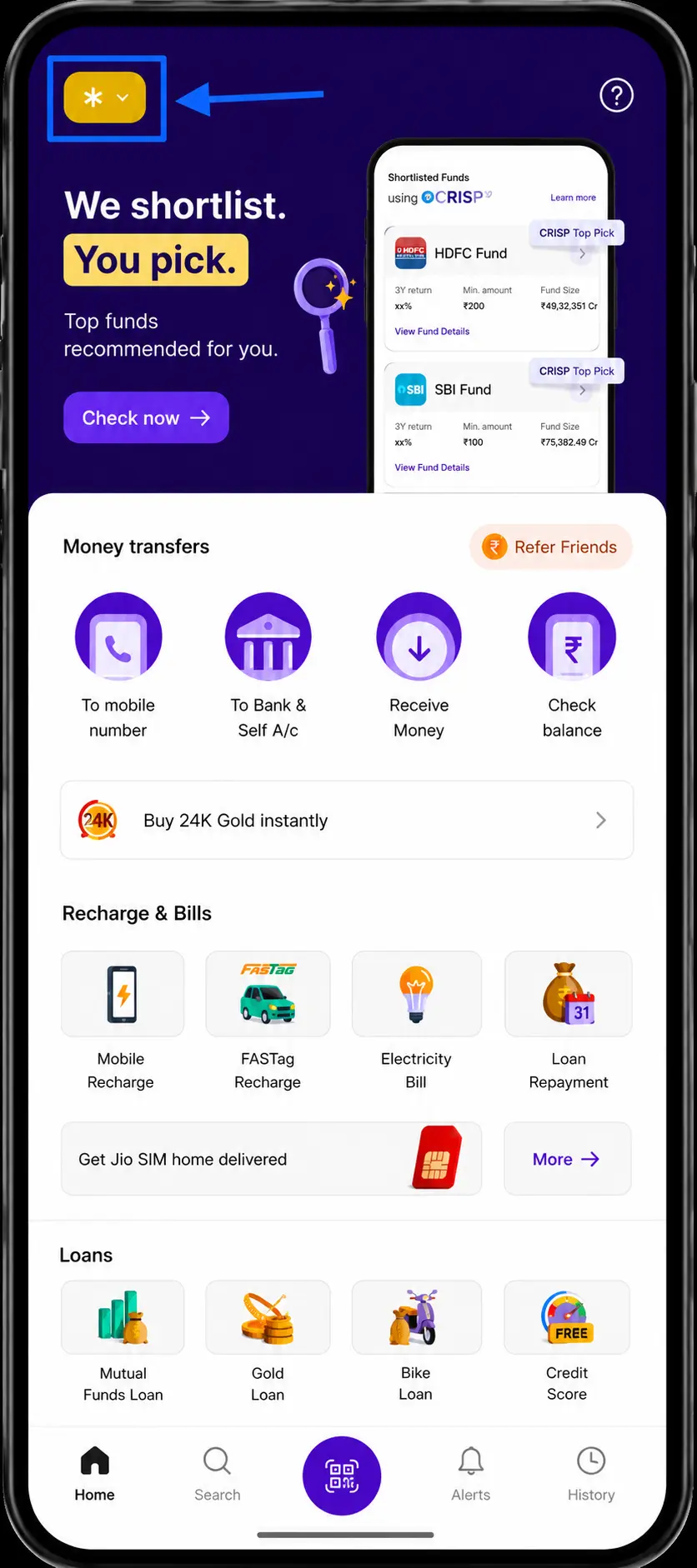
3. Select “Manage Payments” options below QR Code
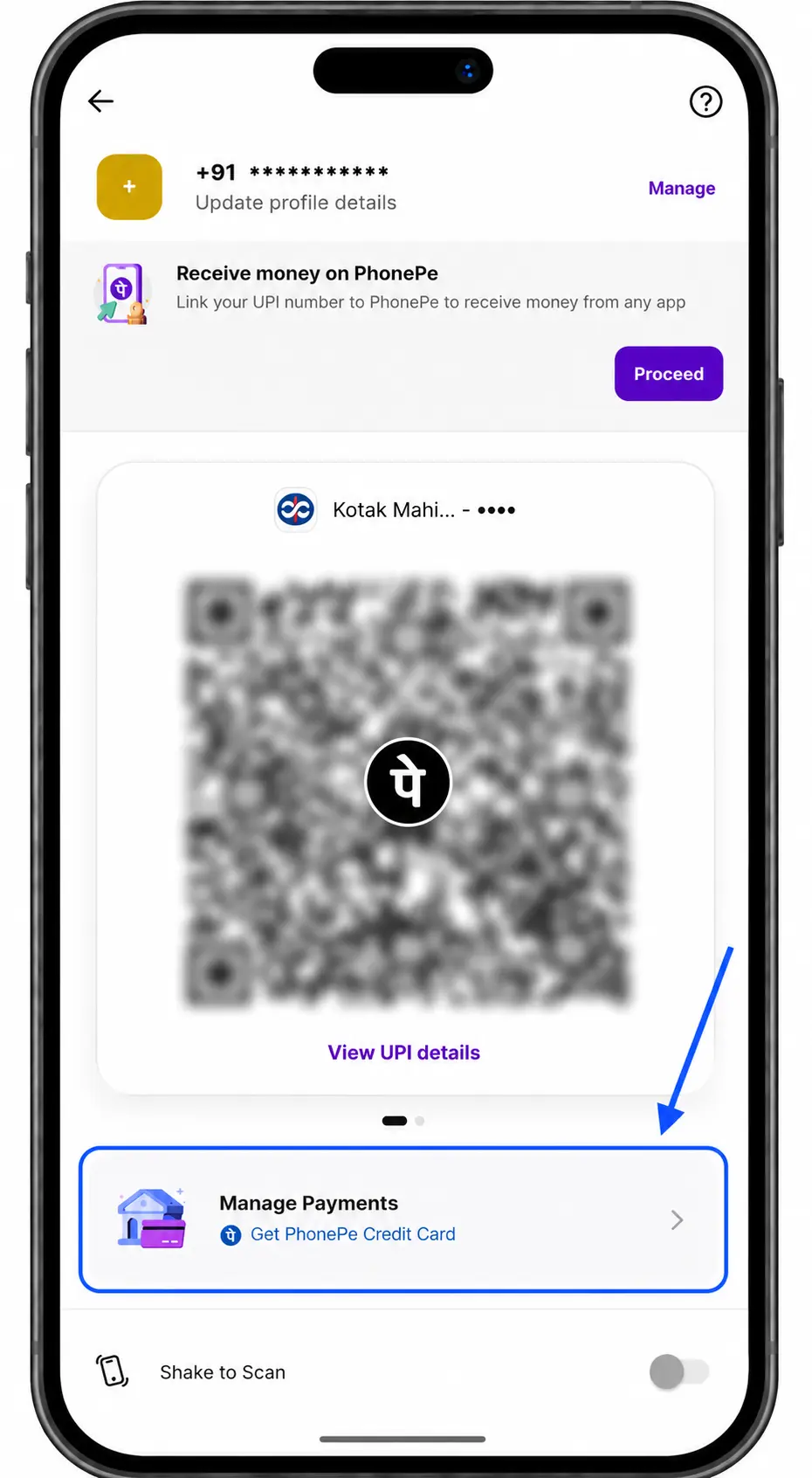
4. Now, click on Bank Accounts option
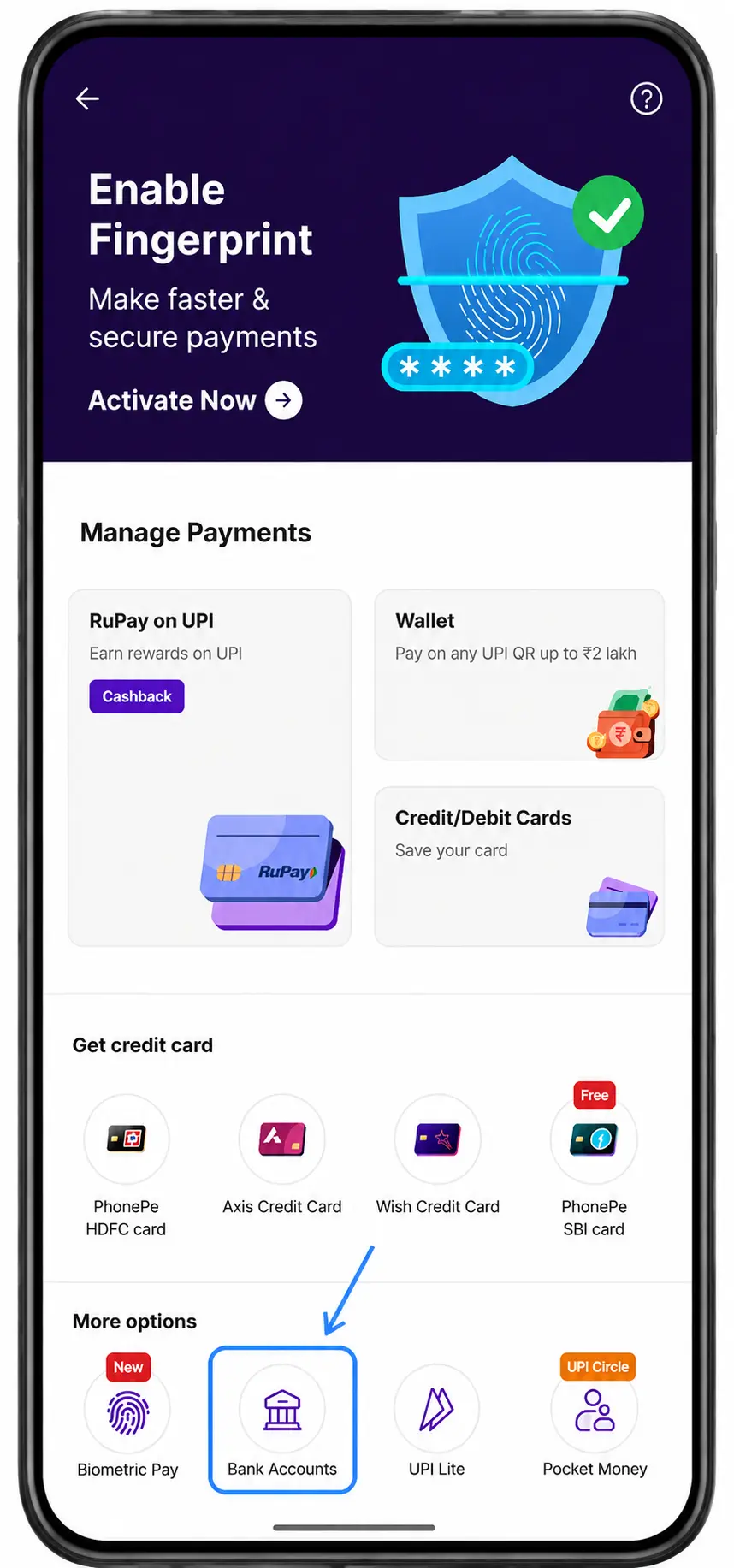
5. Select your bank account from the list of linked bank accounts
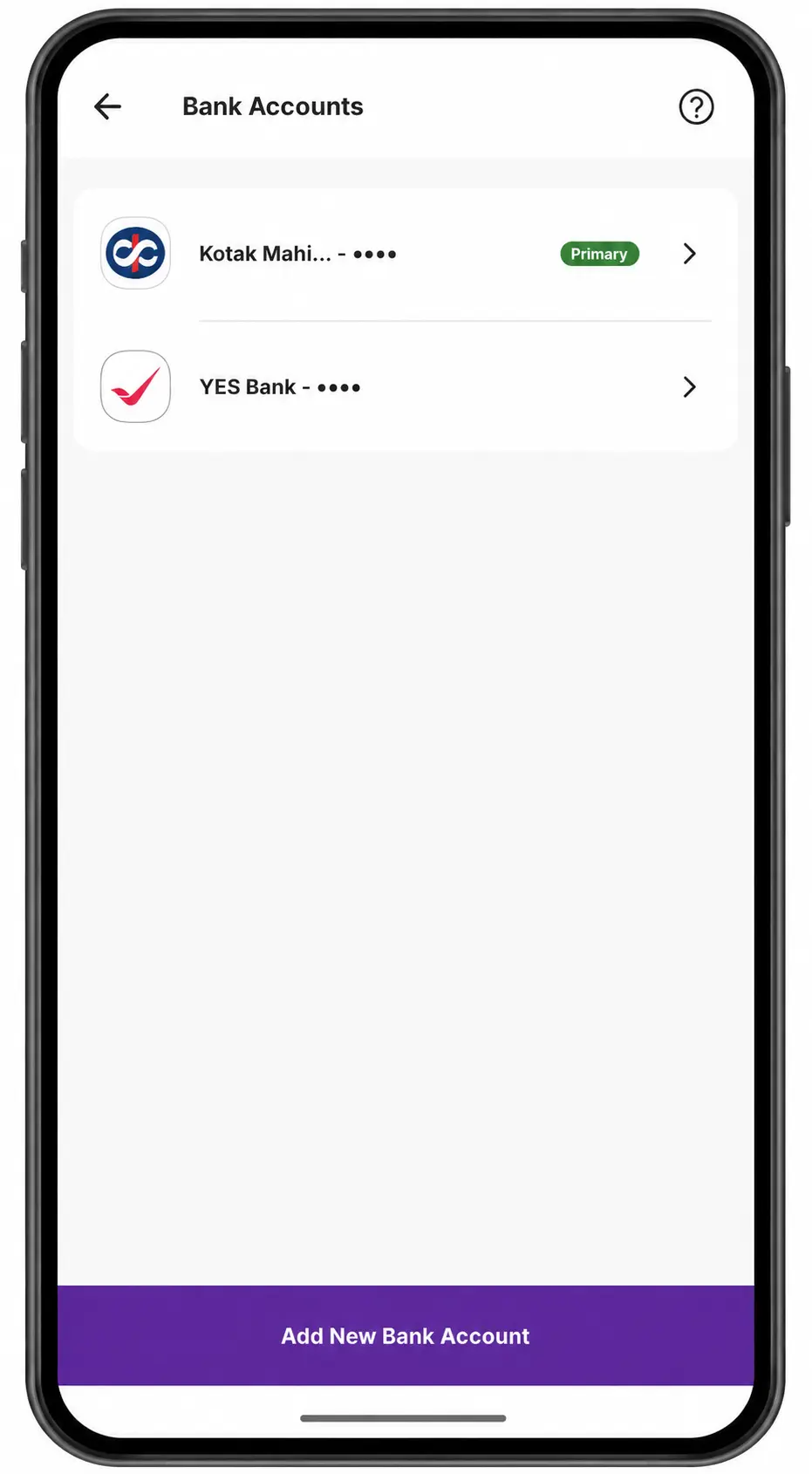
6. Now you can see all your UPI Ids for that particular bank account active in PhonePe
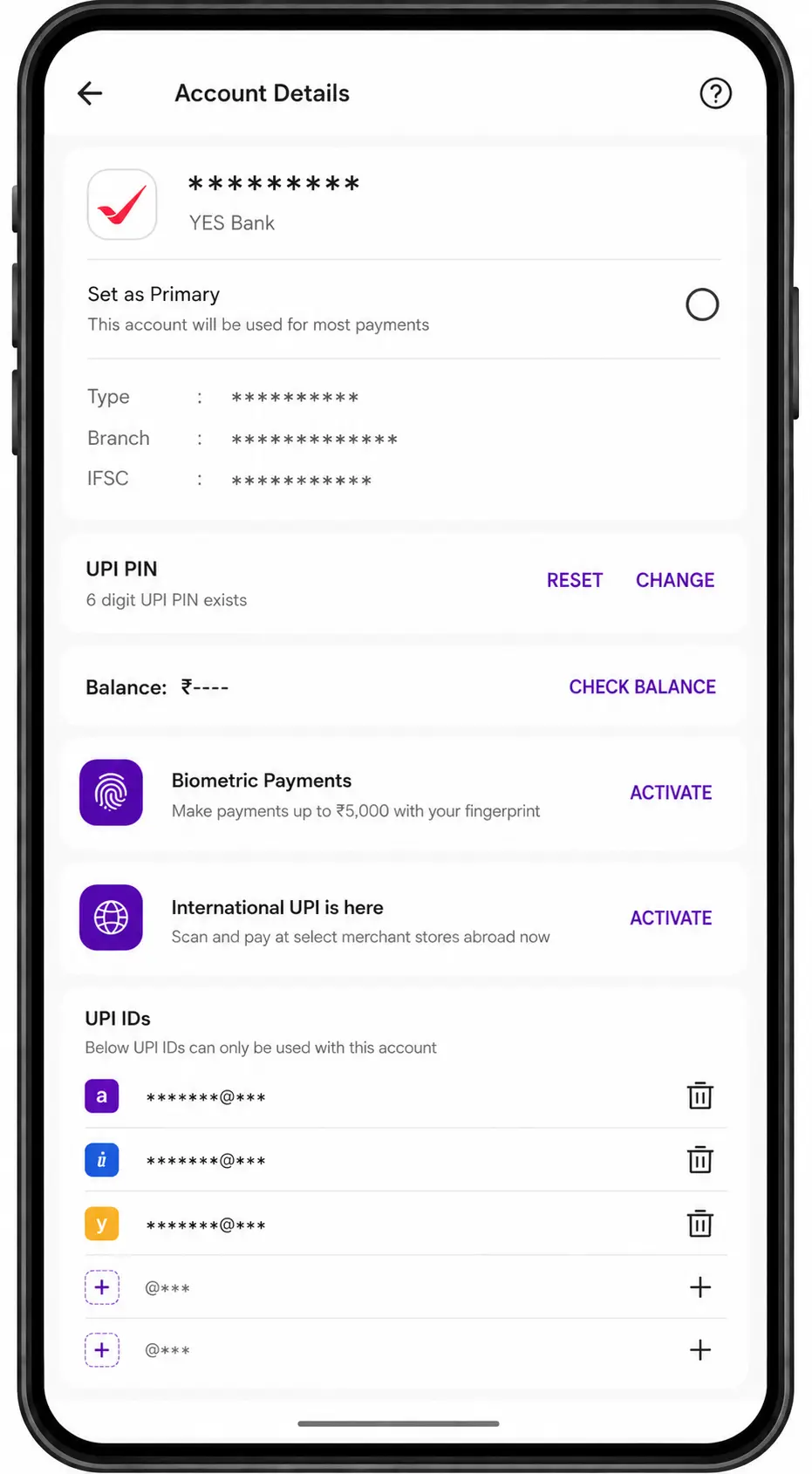
PhonePe allows up to 6 UPI IDs per bank account. Three are auto-generated on setup with @axl, @ibl, and @ybl handles. Three additional slots are available for custom name-based or number-based IDs using the same @axl, @ibl, or @ybl handles. You can also edit or delete non-primary VPAs from this same screen.
How to Create a New VPA
If you haven’t set up UPI yet, the process takes about two minutes:
1. Download any UPI-enabled app, such as Google Pay, PhonePe, Paytm, or BHIM.
2. Register using the mobile number linked to your bank account.
3. Select your bank and verify using your debit card details.
4. Set a 4-digit or 6-digit UPI PIN.
5. Your VPA is auto-generated.
Most apps create your VPA using your phone number by default. You can change the username part to something custom if it’s available, but the @bankhandle stays fixed based on the app. If your preferred username is taken, try adding a number or initial after your name.
In PhonePe, usernames allow letters, numbers, periods, and hyphens. Characters like underscores, slashes, commas, or symbols are not accepted. Maximum length is 35 characters, and at least one letter or number is required. Google Pay does not offer a custom username option.
Once your virtual payment address is set up, here’s what actually happens when someone sends money to it.
How Does VPA Work in UPI Payments?
When someone sends money to your VPA in UPI, three things happen behind the scenes:
1. The sender opens their UPI app, enters your virtual payment address, and confirms the payment amount.
2. The UPI system reads your VPA and identifies the bank account linked to it.
3. Money moves from the sender’s bank to your bank instantly. The sender never sees your account number or bank details.
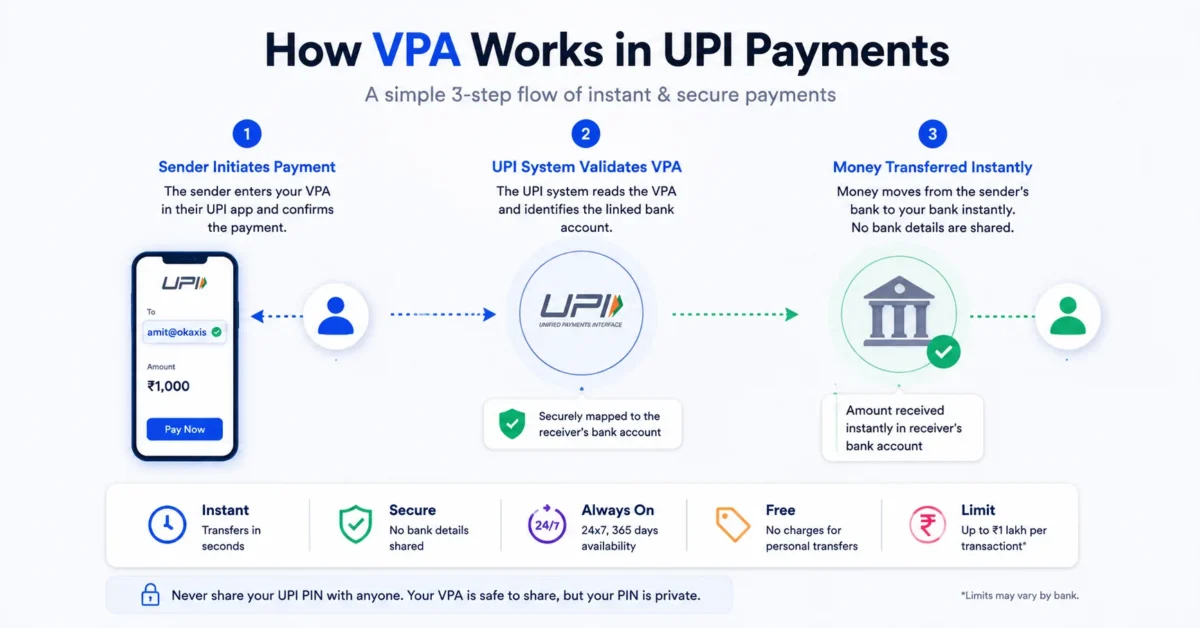
One thing to remember: never share your UPI PIN with anyone. Your VPA is safe to share, but your PIN (4 or 6-digit password) is not.
The entire process takes a few seconds.
UPI transactions work 24 hours a day, 7 days a week, including weekends and bank holidays. There is no processing delay. The money reflects in your account the moment the sender approves the payment.
For personal transfers, UPI charges nothing. No transaction fee, no service charge, no hidden cost. NPCI keeps it free for individual users.
Most person-to-person UPI transfers have a default limit of Rs 1 lakh per transaction, as set by NPCI. Daily transaction count limits vary by bank, so check your app’s settings for your specific cap.
That’s the mechanism. Here’s why it matters for you.
5 Benefits of Using a Virtual Payment Address
VPA solves a few real problems with how money is moved between bank accounts. Here’s what makes it worth using.
1. Privacy
Your bank account number stays completely hidden. The person paying you only sees your VPA. Even if you share it publicly, your banking credentials remain private.
2. Speed
Money moves in seconds. Not hours, not the next business day. UPI transactions settle in real time, regardless of which bank either person uses.
3. Simplicity
Remembering amit@paytm is easier than memorizing a long account number and bank branch code. Sharing it over text or in person takes five seconds.
4. Interoperability
A PhonePe user can pay a Google Pay user without any friction. VPAs work across every UPI-enabled app and every bank on the UPI network.
5. Zero cost
Creating a virtual payment address costs nothing. Using it for personal transfers costs nothing. NPCI does not charge individual users for UPI transactions.
One thing that confuses people is whether the VPA and the UPI ID are different. Quick answer: they’re not.
VPA vs UPI ID: Is There a Difference?
VPA and UPI ID are the same thing. VPA is the technical term used by NPCI and banks. A UPI ID is what apps like Google Pay and PhonePe call it. Both point to your unique payment address.
A few related terms also cause confusion. Here’s what each one actually means:
| Term | What It Means |
| VPA | Virtual Payment Address. Your unique UPI payment ID. |
| UPI ID | Same as VPA. The name apps use for it. |
| Payer Virtual Address | The VPA of the person sending money. |
| Payee Virtual Address | The VPA of the person receiving money. |
| VPA Remark | The short note you add when making a UPI payment. Not your VPA. |
| UPI VPN | Common mix-up. A VPN is an internet security tool. Unrelated to payments. |
For most people, VPA is something you set up once and forget. But if you sell online and accept UPI payments from customers, there’s more to know.
VPA for Ecommerce Sellers and Small Businesses
If you run an online store, your virtual payment address shows up in your business in ways most guides don’t cover.
Fewer COD orders, faster settlements
More buyers now prefer paying via UPI at checkout rather than opting for cash on delivery. For sellers, that means money hits your account before the product ships. No waiting for delivery confirmation, no cash collection cycles, and fewer returns. COD orders typically have higher return rates than prepaid ones.
How payment collection works
When a customer pays via UPI on your checkout page, the payment flows through a payment gateway to your linked bank account. Platforms like Shopify, WooCommerce, and most marketplace integrations already support this. You don’t manually share a VPA with each buyer.
Payments and shipping in one place
Once the payment clears, the next step is shipping. Courier aggregator platforms like iThink Logistics help sellers manage multi-carrier shipping, automated tracking, and NDR from a single dashboard.
Have more questions about how VPA works? Here below, the conclusions are the ones people ask about most.
Conclusion
VPA is one of those things that works so quietly that most people never think about it. But now you know what it is, where to find it, and what happens when you use it.
Which UPI app do you use for payments? And have you ever customized your VPA? Tell us in the comments.
And also, if you’re an e-commerce seller shipping prepaid and COD orders across India, then iThink Logistics can help you manage multi-carrier shipping, tracking, and NDR from one dashboard.
FAQs
Q.1: What is a Virtual Payment Address (VPA)?
A: A virtual payment address is a unique ID used in UPI to send and receive money without sharing bank account details. It follows the format username@bankhandle, like amit@paytm, sneha@oksbi, or number@ubl. You can create one through any UPI-enabled app such as Google Pay, PhonePe, or Paytm.
Q.2: Is VPA and UPI ID the same?
A: Yes. VPA and UPI ID refer to the same thing. “VPA” is the technical term used by NPCI, while “UPI ID” is the common name used by payment apps.
Q.3: How do I find my VPA in PhonePe?
A: Here are the 6 steps to find VPA in Phonepe:
1. Open PhonePe
2. Tap your profile icon in the top-left corner
3. Select “Manage Payments” options below QR Code
4. Now, click on Bank Accounts option
5. Select your bank account from the list of linked bank accounts
6. Now you can see all your UPI Ids for that particular bank account active in PhonePe
Q.4: How do I find my VPA in Google Pay?
A: Here are the 6 steps to find VPA in Phonepe:
1. Open Google Pay
2. Tap your profile icon in the top-right corner
3. Select “Bank Account” option in Payment methods section
4. In the payment methods window, select the bank account linked in GPay.
5. Now click on “Manage UPI IDs.”
6. Now you can check all 3 of your UPI IDs in GPay
Q.5: Can I have multiple VPAs?
A: Yes. PhonePe allows up to 6 UPI IDs per bank account, and Google Pay allows up to 3. You can also link the same bank account across both apps, giving you VPAs on each. Different bank accounts get their own separate VPAs.
Q.6: Is VPA linked to my phone number?
A: Your VPA is linked to your bank account, not directly to your phone number. But the phone number registered with your bank is what connects the two during setup. If you change your number, you’ll need to re-register.
Q.7: What is a VPA remark in UPI?
A: A VPA remark is the short note or description you add when making a UPI payment. It appears in the transaction history of both the sender and receiver. It is not your VPA or UPI ID.
Q.8: What is the difference between a VPA and a VPN?
A: VPA stands for Virtual Payment Address, a payment ID used in UPI. VPN stands for Virtual Private Network, an internet security tool that masks your IP address. They are completely unrelated. People often confuse these 2 terms because of their similar wording.
Q.9: How do I delete or deactivate a VPA?
A: Follow the steps in Q.3 (PhonePe) or Q.4 (Google Pay) above to reach your UPI ID list. Select the VPA you want to remove and tap “delete.” Most apps only let you delete non-primary VPAs. Your primary VPA stays active as long as your bank account is linked to the app. In Google Pay, you cannot delete any UPI ID while an active autopay is linked to it. Cancel the autopay first, then delete.
Author