
Introduction
Your first international shipment is packed, labeled, and ready. You head to customs. And then it stops. The shipping bill won’t generate. The reason? No registered AD Code.
An authorized dealer code is mandatory for every business that imports or exports goods from or to India. Without it, customs won’t clear your goods. No shipping bill. No movement.
Here is exactly what it is, why you need it, and how to register it.
What Is AD Code? Full Form, Meaning and the 14-Digit Format
An Authorized Dealer Code (AD Code) is a unique 14-digit code issued by an RBI-authorized bank, used in customs and foreign trade processes for imports and exports from India.
Only banks authorized by the Reserve Bank of India (RBI) to deal in foreign exchange can issue an AD Code. You can apply for your AD Code only after you have an Import Export Code (IEC).
AD Code full form: Authorized Dealer Code. The “authorized dealer” part refers specifically to a bank licensed by the RBI to handle foreign currency transactions.
Breaking Down the 14-Digit Format
Most guides stop at a 14-digit number. ‘ AD Codes typically follow this structure. Here’s what each segment maps to, using a State Bank of India example:

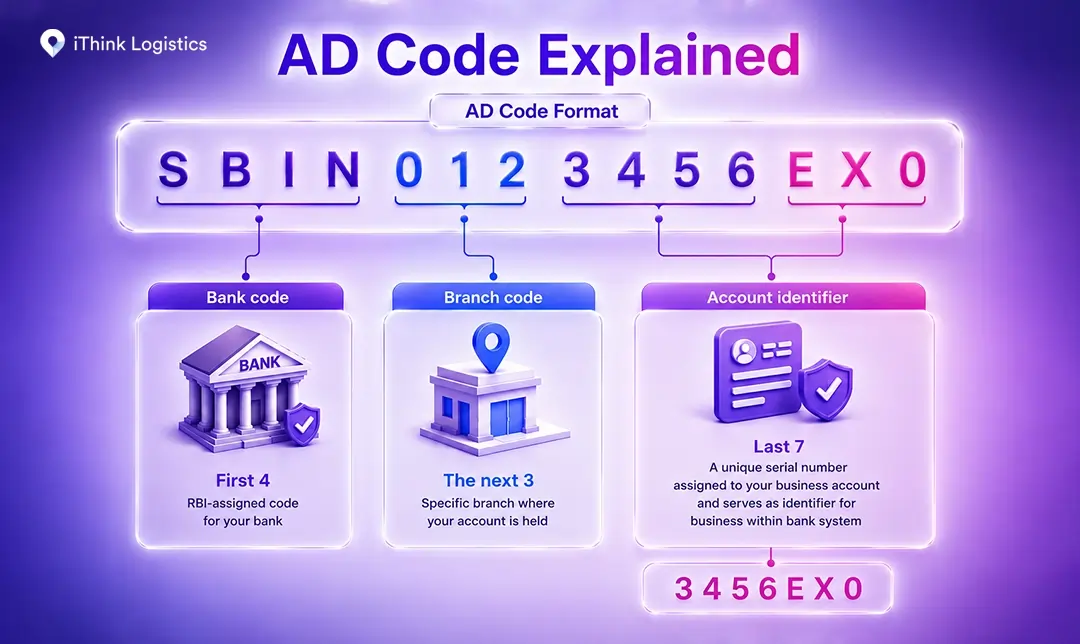
| Segment | Digits | What It Represents |
| Bank code | First 4 | RBI-assigned code for your bank |
| Branch code | The next 3 | Specific branch where your account is held |
| Account identifier | Last 7 | A unique serial number assigned to your business account and serves as identifier for business within bank system |
Exact digit breakdown may vary by bank. The structure above is based on standard issuance patterns.
So an AD Code like SBIN0123456EX0 tells customs exactly which bank, branch, and account the payment will be routed through.
What Is AD Code Used For? Role in Export and Import
AD Code does two jobs: it identifies your authorized bank account to the customs system, and it ensures foreign payments route to the right place.
For Exporters
When you export goods, customs requires you to file a Shipping Bill. The Shipping Bill cannot be generated on the ICEGATE portal without a registered AD Code. The code also ensures that all export proceeds in foreign currency get credited directly to your linked current account.
For international courier exports valued up to Rs 5 lakh, customs requires a Courier Shipping Bill V (CSB-V) instead of a regular Shipping Bill. CSB-V generation on ICEGATE also requires a registered AD Code. No code, no CSB-V, no dispatch.
For Importers
On the import side, AD Code links your bank to customs when filing the Bill of Entry. Without a registered AD Code, your bank may delay or reject the outward foreign currency payment to your overseas supplier. Under RBI guidelines, import payments must route through an authorized bank account, as your AD Code establishes that authorization.
For D2C and Ecommerce Sellers Shipping Internationally
This is a step many ecommerce sellers overlook. If you ship internationally via courier, the CSB-V applies to you, and your AD Code needs to be registered on ICEGATE before you can generate it. Get this in order before your first cross-border order ships, not after. And there is a reason customs treats it as non-negotiable.
Why Is AD Code Mandatory for International Trade?
Skip the AD code, and your shipment doesn’t move. Four reasons why:
- Customs Clearance: The EDI (Electronic Data Interchange) system at customs uses your AD Code to verify your shipment. Without a registered code, the system prevents the Shipping Bill from being generated.
- Foreign exchange tracking: Every rupee that enters or leaves India via trade is monitored by the RBI under the Foreign Exchange Management Act (FEMA). Your AD Code is what connects each transaction to your account.
- Government incentives: GST refunds, Duty Drawback, and RoDTEP (Remission of Duties and Taxes on Exported Products) are all credited directly to the bank account linked to your AD Code. If the code isn’t registered, those credits have nowhere to go.
- Lifetime validity: Once registered for a specific bank account, your AD Code stays valid for life. No renewals. The only time you need a new one is if you change your bank account.
Getting the AD Code letter from your bank typically takes 3 to 7 working days. Registering it on ICEGATE takes a few more steps.
How to Get an AD Code from Your Bank
Your AD code comes from the bank where you hold your business current account. Before applying, confirm your bank is RBI-authorized to deal in foreign exchange, as not all banks qualify.
Step 1: Visit or contact your bank
Visit the branch where your current account is maintained and request an AD Code letter from the branch manager. Your request should include your business name, IEC number, and the reason for the request, such as export or import operations.
Some banks have moved this online. ICICI Bank, for instance, lets customers generate an AD Code letter directly through their Trade One View Dashboard under Trade Banking Services. Check your bank’s trade finance or forex section before making the trip; you might not need to.
This whole process typically takes 3 to 7 working days, though it varies by bank.
Step 2: Submit the required documents
Keep these ready before you approach your bank:
- Copy of IEC certificate (self-attested)
- Company PAN card (self-attested)
- GST registration certificate (self-attested)
- The company’s canceled cheque
- Class 3 Digital Signature Certificate (DSC)
- Director / proprietor / partner ID proof (PAN, Aadhaar, or passport)
- Bank Certificate as per Customs Public Notice No. 93/2020
Step 3: Receive the AD Code letter
After the bank verifies your documents, it will issue an AD Code letter on its official letterhead in the prescribed format. This letter is what you carry into the ICEGATE registration process next.
AD Code Registration on ICEGATE: Step-by-Step)
Getting the letter is half the job. The letter only becomes active after you register it on the ICEGATE portal. “AD code registration” gets 2,400 searches a month in India, and most people get stuck exactly at this step.
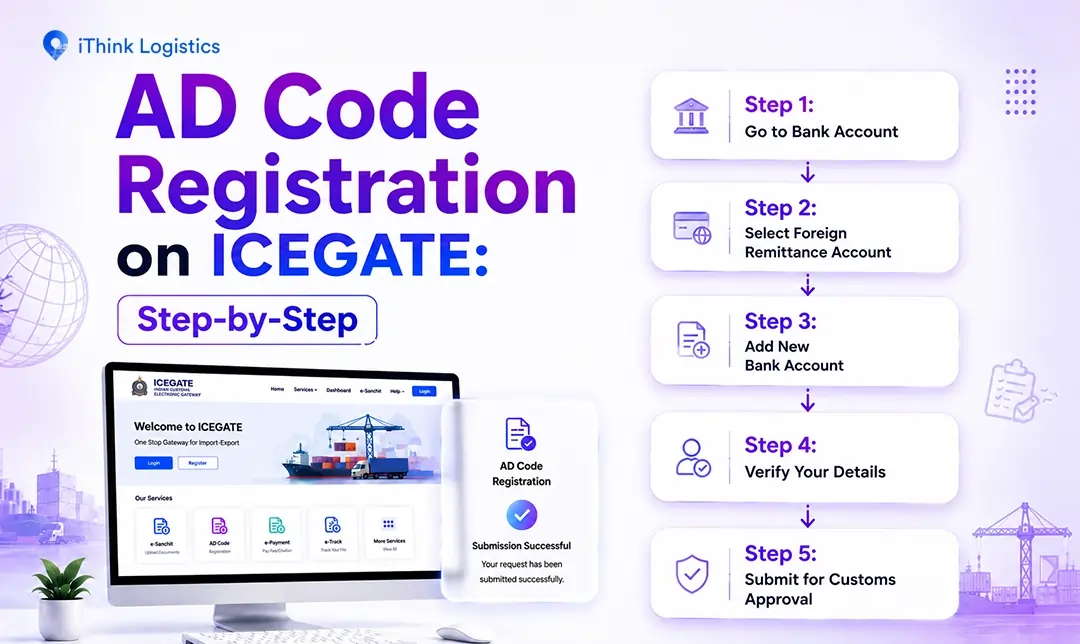
Before you begin, you need an active ICEGATE account. If you do not have one yet, drop a comment below, and we will put together a dedicated step-by-step guide on ICEGATE registration.
Once you are logged in, here is how to register your AD Code:
Step 1: Go to Bank Account
Click the “Bank Account” tab in your profile section.
Step 2: Select Foreign Remittance Account
Choose “Foreign Remittance Account (Authorized Dealer Code)” from the options. This section is where you declare the bank used for making foreign remittances.
Step 3: Add New Bank Account
Click “Add New Bank Account” and fill in the following details accurately:
- Bank name and branch name
- Your AD Code
- Bank account number
- Custom location (the port or airport you are registering for)
- Doc Type and IRN
- Upload your AD Code letter issued by the bank
Step 4: Verify Your Details
Click Verify. The system auto-populates the AD Code under IRN based on your entries.
Step 5: Submit for Customs Approval
Click Submit. Your request goes to the customs authority for review. Once approved, your AD Code becomes active at that customs location.
Now that your AD Code is registered, it helps to understand exactly how it sits alongside your IEC, because the two are often confused, and mixing them up can delay your bank application.
AD Code vs IEC Code: Key Differences
You need both, but in a specific order. IEC comes first because banks require a valid IEC certificate as a mandatory document to process your AD Code request. Without an IEC in hand, you cannot even initiate the bank application.
| Factor | AD Code | IEC Code |
| Full form | Authorized Dealer Code | Import Export Code |
| Issued by | Your bank (RBI-authorized) | DGFT (Directorate General of Foreign Trade) |
| When to get it | After IEC registration | First step before any international trade |
| Purpose | Customs clearance + authorized forex account linkage | Legal authorization to import/export |
| Validity | Lifetime (same bank account) | Lifetime |
| Cost | Free | Rs 500 (DGFT fee) |
IEC requires annual updates on the DGFT portal to remain active, even if no details have changed.
Think of IEC as your license to trade internationally. AD Code is your customs ID card that tells the system exactly which bank account to talk to.
Knowing the difference matters, but knowing where both fit in your full export journey matters more.
Where Does AD Code Fit in Your Export Journey?
AD Code is one step in a larger process. Here is the full sequence from registration to receiving payment:
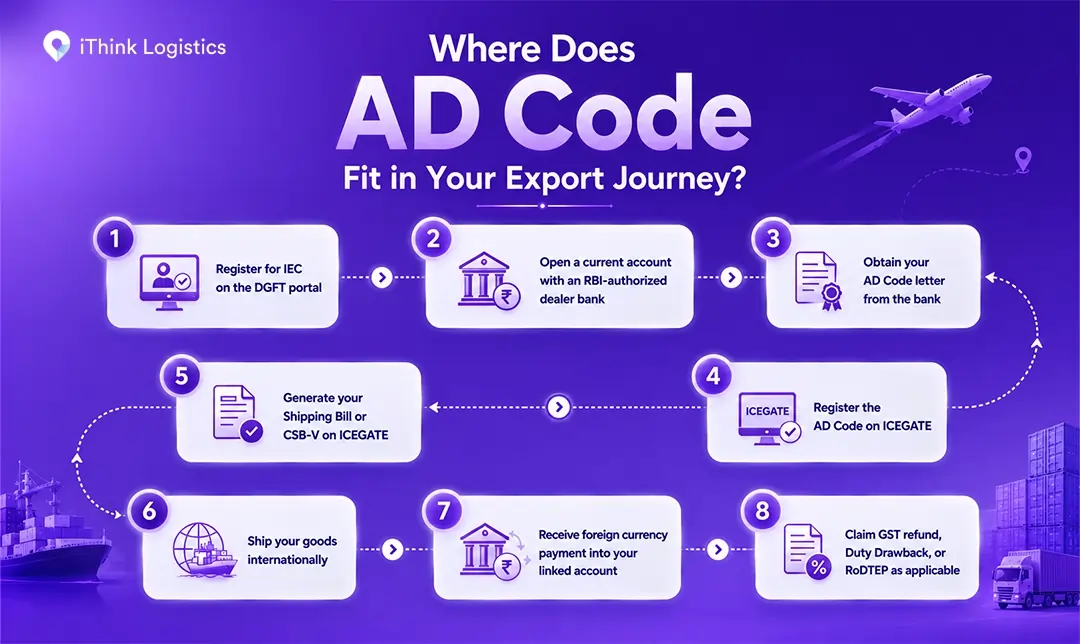
| Step | Action |
| 1 | Register for IEC on the DGFT portal |
| 2 | Open a current account with an RBI-authorized dealer bank |
| 3 | Obtain your AD Code letter from the bank |
| 4 | Register the AD Code on ICEGATE |
| 5 | Generate your Shipping Bill or CSB-V on ICEGATE |
| 6 | Ship your goods internationally |
| 7 | Receive foreign currency payment into your linked account |
| 8 | Claim GST refund, Duty Drawback, or RoDTEP as applicable |
Steps 3 and 4 are where most questions come up. The bank and ICEGATE processes are handled separately, and the connection between them is rarely explained clearly. This guide covers both.
But even with the right steps, a few avoidable mistakes trip up most first-time applicants.
Common Problems in AD Code Registration and How to Fix Them
Most registration rejections come down to five avoidable mistakes:
Problem 1: Data mismatch across documents
Your company name, address, and bank details must be exactly the same on your IEC, PAN, GST certificate, and AD Code letter. Even something as small as “Pvt. Ltd.” on one document and “Private Limited” on another is enough to get your application rejected.
Fix: Check all four documents side by side before you submit anything on ICEGATE.
Problem 2: Wrong DSC type
You need a Class 3 Digital Signature Certificate. But Class 3 alone is not enough, as it must have both signing and encryption capabilities. A signing-only DSC token will fail during submission even if it is Class 3.
Fix: Confirm your DSC has both signing and encryption before you start the ICEGATE process.
Problem 3: Port not mapped
Your AD Code needs to be mapped to each customs house you ship from. Nhava Sheva, Delhi Air Cargo, and Chennai Port are all treated separately on ICEGATE.
Fix: Complete port mapping for every customs location your shipments pass through.
Problem 4: AD Code letter format or self-attestation incorrect
If your bank letter does not follow Customs Public Notice No. 93/2020, customs will reject it. Supporting documents submitted without a seal and signature are also rejected.
Fix: Ask your bank to reissue the letter referencing Customs Public Notice No. 93/2020. Make sure every document you upload, such as PAN, GST, and IEC, has a seal and signature.
Problem 5: Poor document scan quality
Customs inspectors review every uploaded document manually. If a scan is blurry, cut off, or hard to read, it gets rejected.
Fix: Use a scanner or a scanning app to get a clean, clear copy of every document. Check each page before uploading.
Sort these before you start, and your registration will go through the first time.
Getting Your AD Code Right Before Your First Shipment (Conclusion)
Getting your AD Code sorted before your first shipment is one of those things that saves you from a very frustrating delay later. Get the letter from your bank, register it on ICEGATE, and you’re clear on the compliance side for life.
If you’re planning to ship internationally, iThink Logistics ships to 180+ countries and works with D2C brands, e-commerce sellers, SMEs, and B2B businesses shipping internationally from India.
And have you tried registering your AD Code on ICEGATE yet? Drop a comment below; let us know how it went. Smoothly, or did you hit a roadblock?
FAQs
Q.1: What is the full form of AD Code?
A: AD Code stands for Authorized Dealer Code. It is a 14-digit number issued by an RBI-authorized bank that links your business current account to the Indian customs system for import and export transactions.
Q.2: Is AD Code mandatory for export and import?
A: Yes, it is mandatory for both. Without a registered AD Code, the ICEGATE portal will not generate a Shipping Bill for exports or a Bill of Entry for imports. Your shipment gets blocked at customs.
Q.3: Do you need a separate AD Code for each port?
A: You get one AD Code from your bank. As per recent customs guidelines, that single code is generally valid across all customs locations in India once registered. Some ICDs and smaller airports may still require individual port mapping so check with the specific customs authority if unsure.
Q.4: How long is an AD Code valid?
A: An AD Code is valid for a lifetime as long as your bank account stays active and unchanged. If you switch banks, move to a different branch, or close the account, you need a new AD Code from the updated account.